“Find me an opening on Friday afternoon.” Would you want an agent to book it immediately?
The distance between finding an option and confirming it is a design decision. An interface for agents needs to express that distance as clearly as a button designed for people.
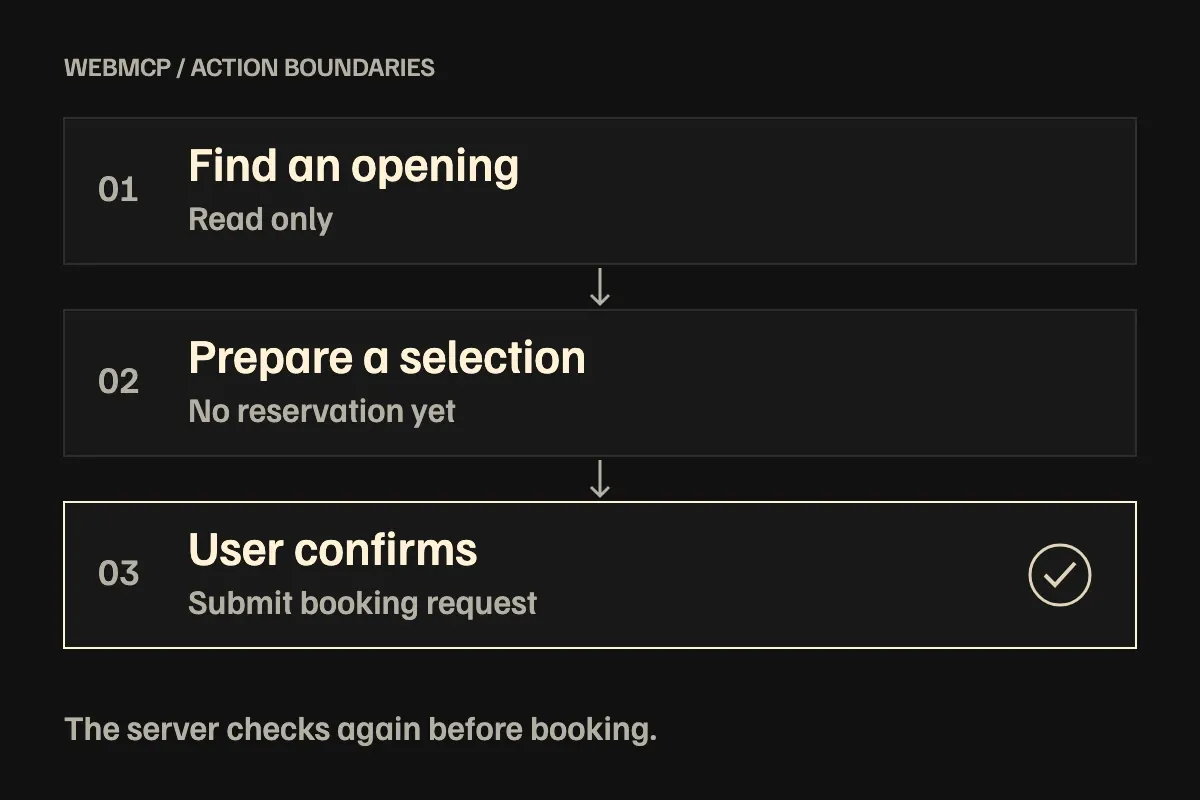
Design a booking flow
Imagine a studio booking website. One possible division of actions is:
Proposed action | Result | Creates an appointment? |
|---|---|---|
| Available times | No |
| A draft selection visible in the form | No; it does not reserve the slot |
| A request submitted after user confirmation | Yes, if the server accepts it |
These are illustrative application actions, not built-in WebMCP API names.
The name prepare_booking makes a promise: calling it does not create an appointment. If it sends confirmation emails and charges a card, its description is wrong. WebMCP’s guidance similarly recommends distinguishing the initiation of a process from the execution of an action. Tool-design guidance.
In this example, selecting 3 p.m. should put that time, its date, timezone, and price into the visible form. The person can revise or abandon the selection. Confirmation triggers a booking attempt; the server must still check authorization and availability at that moment.
If someone else has taken the slot, report that state and retain the selection so the person can understand what happened. Silently choosing another time and submitting it would be a different action from the one requested.
Read access has boundaries too
Available slots and a person’s existing appointments both look like read-only data. Their access requirements differ.
Chrome warns that read-only tools can expose private information and need appropriate access boundaries. Its guidance also includes annotations for consequential actions. Treat these as signals, rather than your application’s authorization mechanism. WebMCP security guidance.
For the hypothetical studio, public availability could be searchable while personal appointments require an authenticated session. The agent path and the form path should use the same server-side rules, preventing the new interface from becoming a less protected shortcut.
Start an experiment with availability search. Check that unsupported browsers retain a working form, tool results match the screen, newly unavailable times produce clear feedback, and asking what is available creates no appointment.
Only then add confirmation. For this flow, success means the agent completes the authorized task while the person can see and control the booking decision.
Comments (0)